
Raja Game Wallet Help • Invite Code: 989136415017
Raja Games Logo
RAJA GAMES Deposit & UTR Guide
Login
💳 Wallet & Payment Guide

Raja Game UPI-QR Deposit & Submit UTR Guide

Learn how to complete fast ₹100+ deposits on Raja Games using Innate UPI-QR or UPI-QR and verify your transaction instantly using Submit UTR.

💳 OPEN RAJA GAME WALLET

How to Deposit via UPI-QR & Submit UTR

1

Select Wallet → Deposit

Sign in to your Raja Game account and choose Innate UPI-QR or UPI-QR (starts from ₹100.00).

2

Complete Payment in Your UPI App

Pay via PhonePe, Google Pay, or Paytm and copy the 12-digit UTR / Ref Number from your receipt.

3

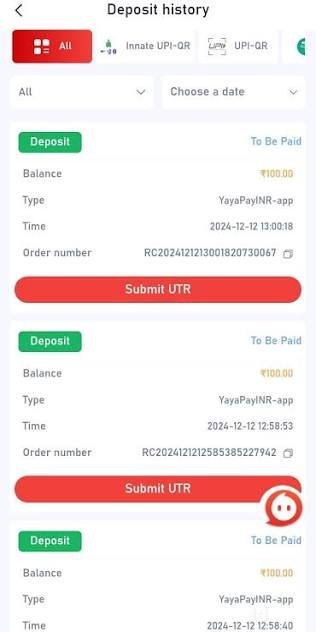
Tap Submit UTR in Deposit History

Open Deposit History, match your order number, tap the red Submit UTR button, and enter the 12-digit reference.

Raja Game Login & Withdrawal Best Practices

Keep your Raja Game Login password confidential and bind only your own active bank account or UPI ID before requesting a withdrawal. If a deposit remains in To Be Paid status after payment, submitting the exact UTR inside Deposit History—or tapping the floating customer support icon—resolves verification rapidly without creating duplicate orders.

⚡ REGISTER / LOGIN ON RAJA GAME